Station Uptime — How It Works
TL;DR
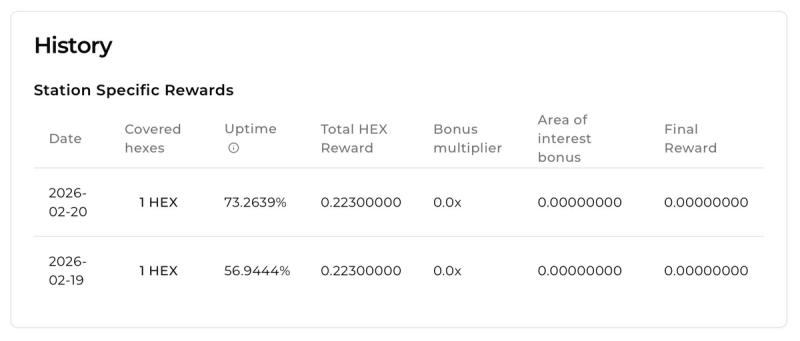
Your station is considered online when it pushes data regularly to MastChain.
Uptime is calculated in 5-minute windows across the day.
A properly configured station should have no trouble maintaining 80%+ uptime.
What “Online” Means
Stations are expected to push data to the server once per minute.
It does not matter what the station detects during that minute. Whether it picks up vessels, receives non-rewardable messages, or detects no traffic at all — uptime only depends on whether the data push happens consistently.
If we see a steady stream of data coming from your station, it is considered online.
The 5-Minute Grace Window
While data pushes are expected every minute, we understand that real-world systems are not perfect.
Your station can go up to five minutes without sending data before it is marked offline. This allows for normal events such as service restarts, hardware reboots, brief power interruptions, or short network drops.
Short gaps under five minutes do not reduce your uptime.
A station is only considered offline when there is a gap longer than five minutes between data pushes. Only that specific time window counts against your uptime.
Uptime Status Colors
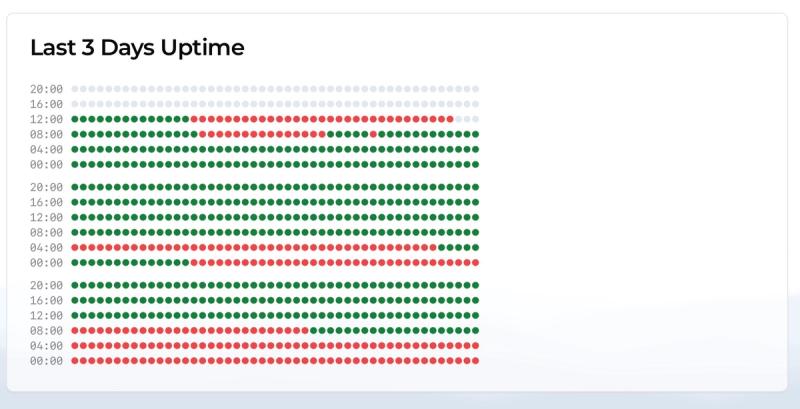
🟢 Green = Online
Your station is actively pushing data to the server.
There are no gaps longer than 5 minutes between data pushes, and your uptime is being counted as active.
🔴 Red = Offline
Your station has not sent data for more than 5 minutes.
That time window is marked as offline and will reduce your daily uptime percentage.
How Daily Uptime Is Calculated
Each day is divided into 5-minute slots.
There are 1,440 minutes in a day, which means:
1,440 ÷ 5 = 288 total 5-minute slots per day.
Your uptime percentage is calculated as:
Online slots ÷ 288.
For example, if your station is online for 230 out of 288 slots, your uptime would be approximately 80%. You must maintain 80% uptime to be eligible for rewards.
What to Expect
A stable and properly configured station should not struggle to maintain uptime above 80%.
If your uptime is consistently below that level, it usually indicates:
- Unstable internet connection
- Hardware instability
- Service misconfiguration
Ensuring your station pushes data every minute and remains connected will naturally keep your uptime high.
FAQ — Station Uptime
Why is my station showing low uptime even though it’s running?
Uptime is based on whether the server receives data pushes from your station. If your device is powered on but not successfully sending data every minute, it may still be marked offline. Check your internet connection, firewall settings, and service logs.
Does missing a few minutes hurt my uptime?
Not necessarily. Short interruptions under five minutes are allowed and do not count against you. Only gaps longer than five minutes are marked as offline time.
What happens if I reboot my station?
Reboots are fine as long as the downtime stays under five minutes. If the restart takes longer than that, the excess time will count as offline in your daily uptime calculation.
Does vessel traffic affect uptime?
No. Uptime only measures whether your station is pushing data to the server. It does not depend on how many vessels are detected.
What is considered a good uptime percentage?
A properly configured station with stable internet should consistently stay above 80% uptime. If you are regularly below that level, it’s a strong signal that something in your setup needs attention.